GIS Viewer
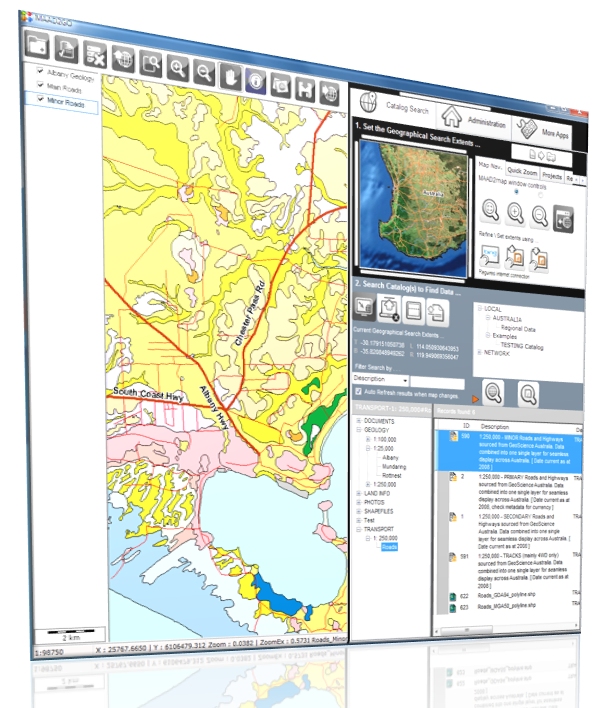
The GIS Viewer is the major new functionality included in this version of MAAD2GO.
The GIS Viewer provides the ability to display and query many different spatial formats, either singularly or combined in a real world projected coordinate view. Where once only proprietary software could only display proprietary formats, this is now achievable through the one integrated MAAD2GO interface. This means that everyone can now view and query GIS data.
The main features of the GIS Viewer are;
- Display, Navigate and Query MapInfo TAB, ESRI Shapefiles, AutoCAD DXF & DWG, Microsotation DGN, plus many more.
- Query internal metadata information.
- Print the map data using a common company template.
- Reproject base data into common coordinate systems or projections.
- Export from one GIS format to another.
Thumbnail Support for PDF files
Functionality has been provided to create a thumbnail image of the first page of a PDF document for inclusion within the popup window. Currently, this functionality works only if a full version of Adobe Acrobat is installed on the client PC that is undertaking the request, as MAAD2GO utilises underlying Acrobat dll’s and functions to do so. This functionality is to be upgraded in future releases to be completely standalone where a thumbnail of a PDF file can be generated without the requirement of Adobe Acrobat.
Updated Metadata Functionality
Functionality provided to update thumbnail and spatial extents of a file reference.
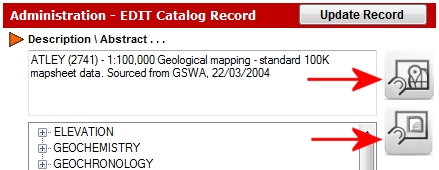
Image Backdrop for Map Search Window
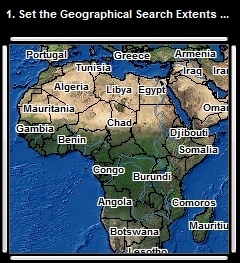
Functionality provided to include an ecw image as a backdrop to the Map Search Window to increase the visualisation of this interface. This ecw is customisable, as are the underlying GIS data used within the Map Search Window, provided you have appropriate software to do so. When changing or altering this data, filenames and internal structures must be maintained.
Catalog Copier - Export Files to Local Drive
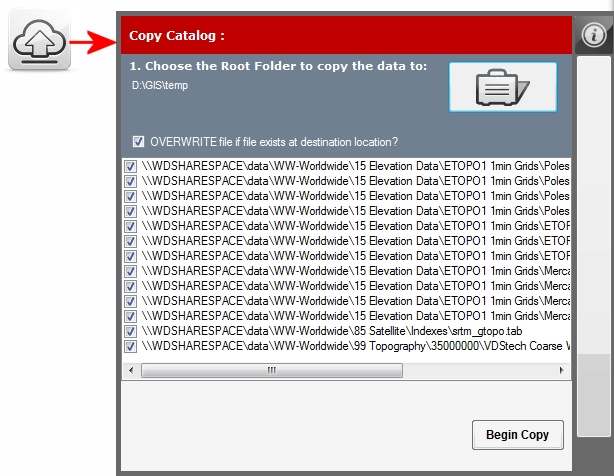
Functionality has been included to export (copy) the current geographical search results (i.e. the underlying data) from its original storage location to another drive or directory location. This enables someone who is travelling away from the primary storage location (where data is stored on a network) the ability to take a copy of the data with them for a specific geographical extent. This functionality is to be updated in future releases to include a copy of a catalog that the sub-setted data originated from.