MAAD2gO - Version 4.0
Date of Release : 07 July 2012
Version 4.0 contains many features that were earmarked for release in version 3.5 (01 May 2012), and have been combined for release under the banner of version 4.0.
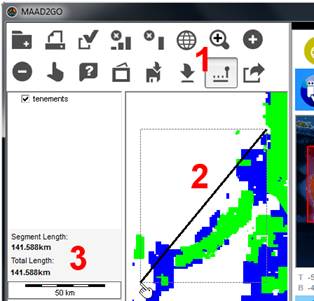 |
Measure Distances.
Added distance measure tool to the GIS Viewer.
This option will measure the distance (in kilometres) from a point to a point along a straight line.
A running total can be calculated if you select this option again without doing any other map function (i.e. zoom in \ out, etc.).
|
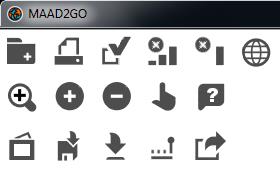 |
New GIS Viewer Icons.
Updated map buttons within the GIS Viewer.
This was done not only to give the buttons a cleaner look, but also to handle additional functionality currently in development.
|
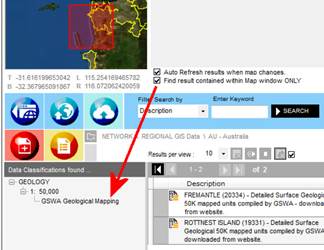 |
Show Search Results Entirely Within.
Updated the Spatial Searching functionality: Added checkbox to 'Show Search Results that are contained entirely WITHIN the Map Search Window ONLY'.
The default is still for all records that fall over the search window extents, but now you can find records that may exist entirely within.
|
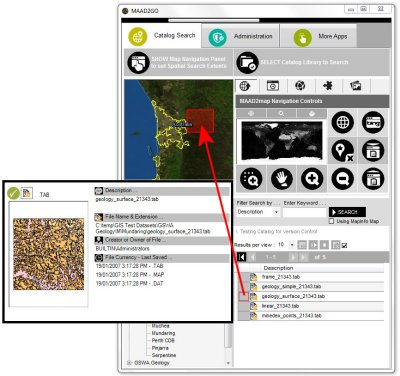 |
Quickview display of a Layer's Extents.
Visually display the geographical extents for searched and discovered dataset records within the MAAD2map map window display.
This feature makes it easier the visually identify where the dataset is geographically located before the record is accessed and opened.
To use this feature, simply roll the cursor over the button as you would to display the Thumbnail Popup Preview window. A red rectangle is then displayed within the MAAD2map map window panel.
Knowledge Base article that refer to this item: KB2008.
|
|
Change temporary directory location.
The option to change the default temporary directory location away from MY Documents\MAAD to a directory of your choice has now been provided.
Knowledge Base articles that refer to this item: KB3009.
|
Bigger Interface - More options visible.
The MAAD2gO interface has been made wider (only by 100 screen pixels) in order to make commonly used buttons more visible.
MAAD2gO still sits nicely on the right hand side of the screen, and included is the ability to set the active starting panel visibility - either the catalog library listsing (default) or the map control buttons.
Knowledge Base article that refer to this item: KB3008.
|
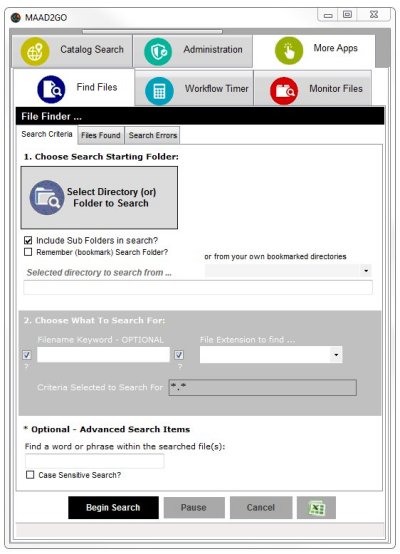 |
Find Files Search Interface makeover.
The 'Find Files' interface has also been updated to be clearer and more efficient to use.
The 'Find Files' is a brute-forced search utility, which allows you to search for files within folders\directories, based on various criteria including words or phrases inside files.
This utility does not work with any pre-indexed databases, but from the file's storage location directly. As a result, search times can be variable, but it does deliver correct results every time and does not have to wait until master indexes are updated or cached.
This interface is currently undergoing additional development to incorporate catalog library integration, predominantly to report on files within directories that are\are not included within libraries.
This will be available in subsequent updates in the near future.
Knowledge Base article that refer to this item: KB4003.
|
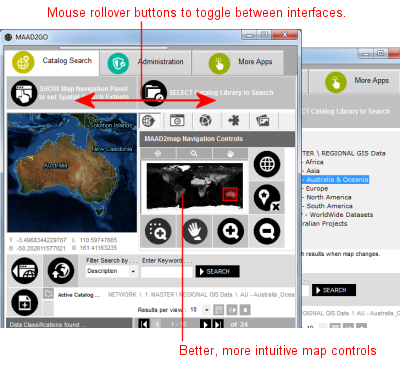 |
Better, More Intuitive MAAD2map interface.
To ensure MAAD2gO stays as streamlined as possible and takes up the minimum amount of space on your desktop, a few nifty interface design options have been included.
Part of this better and more intuitive redesign provides functionality to easily toggle between the MAAD2map and the Catalog Library Selection interfaces by just rolling your mouse over the required buttons.
Also, the MAAD2map controls have been completely overhauled to be way easier to use. This includes much better zooming and panning options, as well as an overview map that is linked to the main MAAD2map map window.
Knowledge Base articles that refer to this item: KB2001 & KB2002.
|
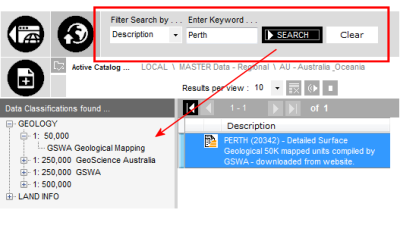 |
Filter By Keyword Enhanced.
The 'Filter Search' interface options has also been updated to be clearer to use. An additional button to 'Clear Keyword Filter' has been added to easily clear the search and return to the default search.
The repositioned Main SEARCH button, (now located next to filter search options) will aid searching functionality.
Knowledge Base articles that refer to this item: KB2001 & KB2002.
|
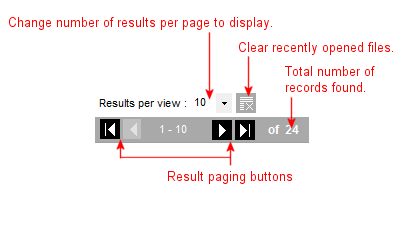 |
Paging of Results For Faster Returns.
No body likes to wait, and searching for and returning results in MAAD2gO is no exception.
A definite performance hit is suffered when a lot of results are being returned at once, and performance testing has confirmed this.
Therefore paging of results has been introduced, and the user has the ability to navigate through the results by page increments, as well as go to the first or last results found.
Knowledge Base article that refer to this item: KB2007.
|
 |
Easier Methods to Access & Open Your Files.
Along with the already easy methods MAAD2gO provides to open and access files that have been returned from a spatial search, another option has been added.
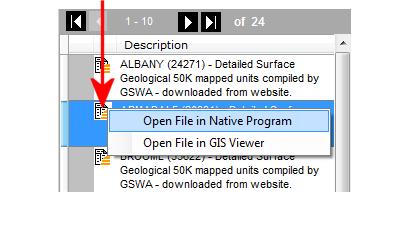
Single clicking of the file extension icon (located next to the popup preview window button) displays a File Open Option Toolstrip menu.
The main option ‘Open File in Native Program’ displays the file within the program the file extension is associated with within the operating system.
Note: Only spatial files can be opened into the GIS Viewer, and the GIS Viewer interface must be open and active for a file to display.
Knowledge Base article that refer to this item: KB2002.
|
 |
Store Catalog Libraries in SQL Server.
If you are looking for a more centralised catalog library storage, or the ability to grow your 'Standard' MAAD2gO catalog greater than 2Gb in size, you can now upload and store your MAAD2gO catalog library in SQL Server.
Using SQL Server Management Studio to upload and manage your SQL Server environment, catalog libraries can be stored within the Express versions to the Standard versions.
Knowledge Base article that refer to this item: KB3003.
|
 |
Easier Editing of Data Classifications.
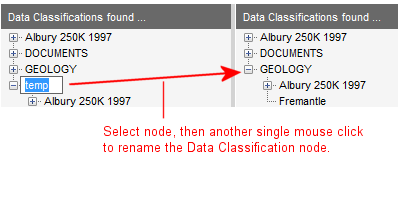
If you have administrator access, you can now edit data classification entries directly via the Data Classifications interface, which makes Catalog maintenance easier.
Simply mouse click a node after it has been selected to alter the contents of that node, then enter the new data classification. This changes any underlying sub classifications or nodes beneath the tree structure.
Also, you can now easily delete all records under a data classification node (plus any subsequent sub nodes) by double right mouse clicking a node. This again saves time in maintaining catalog entries.
Knowledge Base article that refer to this item: KB3007.
|
 |
Adding Files and Metadata to catalog Libraries made even easier.
Backend administration functionality has been enhanced for adding files to catalog libraries. These include;
- Rejigging the way a spatial files' geographic metadata information is extracted and then added to a catalog to be significantly faster.
- Providing the ability to add additional Comments and Keywords when adding a single file reference to a catalog library.
- Through the Bulk Upload functionality, included the ability to select files with 'non-standard' file extensions.
|
 |
Expanded Catalog Choice on Start for Faster Access to Data.
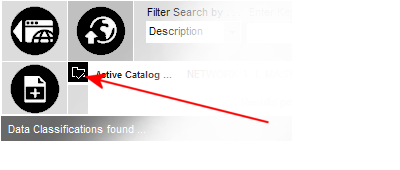
The Catalog Library selection list can now be fully expanded on starting the application, which limits the number of mouse clicks required to perform a spatial search.
To set the list in expanded mode, simply select a catalog library and then choose the button.
Next time MAAD2gO is started, the catalog library selection list will be expanded at this point in readiness for the user to select a catalog to search.
|
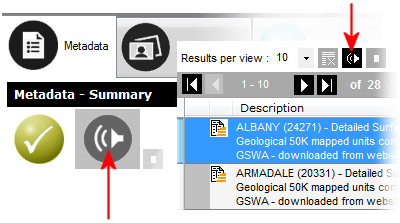 |
Why Read? Listen instead.
Introduced in this version is a feature for all the lazy people among us that would rather have someone read the descriptions to them than actually reading them for themselves.
In all seriousness, this feature utilises the text to speech functionality within .NET 3.5 and your Windows operating system, and is actually the precursor to providing voice command activations in the future.
|
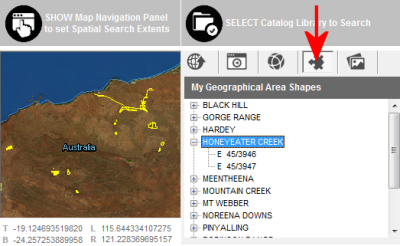 |
Add your own area defined GIS spatial file for quick access to your locations.
You can now store your company defined geographical areas as shapes within your favourite GIS file format (TAB or SHP) which can be displayed within the MAAD2map interface.
Ensuring the provided file structure is maintained, internal file selections can be selected to order to fast zoom to specific locations.
|
 |
Better Catalog Maintenance.
More configuration options to customise your MAAD2gO experience when you start;
- Functionality added to disable the rollup function,
- Show the GIS Viewer
|
The following was added in version 4.0.5
Date of Release : 17 October 2012
|
Quickview display of a Layer's Extents.
Visually display the geographical extents for searched and discovered dataset records within the MAAD2map map window display.
This feature makes it easier the visually identify where the dataset is geographically located before the record is accessed and opened.
To use this feature, simply roll the cursor over the button as you would to display the Thumbnail Popup Preview window. A red rectangle is then displayed within the MAAD2map map window panel.
Knowledge Base article that refer to this item: KB2008.
|
|
Change temporary directory location.
The option to change the default temporary directory location away from MY Documents\MAAD to a directory of your choice has now been provided.
Knowledge Base articles that refer to this item: KB3009.
|
Bigger Interface - More options visible.
The MAAD2gO interface has been made wider (only by 100 screen pixels) in order to make commonly used buttons more visible.
MAAD2gO still sits nicely on the right hand side of the screen, and included is the ability to set the active starting panel visibility - either the catalog library listsing (default) or the map control buttons.
Knowledge Base article that refer to this item: KB3008.
|
|
Find Files Search Interface makeover.
The 'Find Files' interface has also been updated to be clearer and more efficient to use.
The 'Find Files' is a brute-forced search utility, which allows you to search for files within folders\directories, based on various criteria including words or phrases inside files.
This utility does not work with any pre-indexed databases, but from the file's storage location directly. As a result, search times can be variable, but it does deliver correct results every time and does not have to wait until master indexes are updated or cached.
This interface is currently undergoing additional development to incorporate catalog library integration, predominantly to report on files within directories that are\are not included within libraries.
This will be available in subsequent updates in the near future.
Knowledge Base article that refer to this item: KB4003.
|
|
|
|